


If an employee clicks a phishing link, the first priority is not blame. It is finding out what happened and limiting what an attacker may be able to do next.
A click does not always mean an account or device has been compromised. But if the employee entered a password, approved a login request, downloaded a file, or gave away sensitive information, the risk is much higher.
The safest response is simple: report the click immediately, contain the affected account or device, change exposed credentials, end active sessions when needed, and check for suspicious activity.
The Federal Trade Commission recommends moving quickly after a suspected breach, including securing affected systems, changing compromised credentials, and investigating what the attacker may have accessed.
What should happen immediately after someone clicks?
Start by asking the employee exactly what happened.
Did they only open the page? Did they enter a username and password? Did they download a file? Did they approve a multifactor authentication request? Did they provide payment, customer, or company information?
Those answers determine the next steps.
If malware may have been downloaded, the affected device may need to be disconnected from the network while IT investigates. The FTC advises businesses to disconnect infected devices from the network without immediately powering them down, since shutting them off can remove information useful during an investigation.
The employee should also stop interacting with the message or website and contact the company’s IT or security contact.
Do not wait to see whether anything unusual happens.
Treat the password as compromised.
Change it through the company’s official login system, not through the phishing link. If that password was reused anywhere else, those accounts should also be reviewed and changed.
But changing the password may not always be enough.
An attacker who already signed in may still have an active session. In Microsoft 365 environments, Microsoft specifically recommends revoking active sessions after an account compromise so stolen credentials or session access cannot continue being used.
IT should also review:
Recent sign-ins from unfamiliar locations
New devices or authentication methods
Unexpected password or security changes
New mailbox forwarding rules
Messages sent from the employee’s account
Applications recently granted account access
If the employee approved an unexpected MFA request, tell IT immediately. That may indicate the attacker was already attempting to sign in.
Sometimes.
If the employee only entered credentials into a fake website, the main concern may be the account rather than the computer itself.
If they downloaded a file, installed software, opened an attachment, or something unusual started happening on the device, disconnecting it from the network may help prevent further communication or spread.
The employee should avoid trying to clean the computer themselves.
Have IT or a cybersecurity professional determine whether the device needs to be isolated, scanned, restored, or replaced.
The FTC recommends immediate investigation of compromised devices and isolating affected systems where necessary to prevent the incident from spreading.

Make reporting simple.
Ask the employee to provide:
The phishing email, text, or message
A screenshot if available
The link they clicked
The approximate time it happened
Whether they entered a password
Whether they approved an MFA request
Whether they downloaded or opened anything
Any information they submitted
Employees should report what happened as accurately as possible, even if they feel embarrassed about clicking.
Fast reporting gives IT more time to stop unauthorized access, reset credentials, isolate a device, and warn other employees who may have received the same message.
The FTC encourages businesses to train employees to report phishing attempts and to alert others when an attack may be affecting more than one person.
The middle of an incident is not the best time to decide who an employee should call or what IT should do.
Create a short phishing response process before anyone needs it.
Employees should know:
Where to report the message
What information to provide
Who handles the account or device
When credentials need to be changed
When active sessions should be revoked
When leadership needs to be informed
IT should also have access to the logs and administrative tools needed to investigate the account quickly.
The FTC recommends that small businesses maintain an incident response plan that explains how the organization will detect, respond to, and recover from a security incident.
Most importantly, make it clear that employees will not get in trouble for reporting a legitimate mistake quickly.
If people believe reporting a click will lead to blame or embarrassment, they may wait.
That delay can give an attacker more time than the original click ever did.
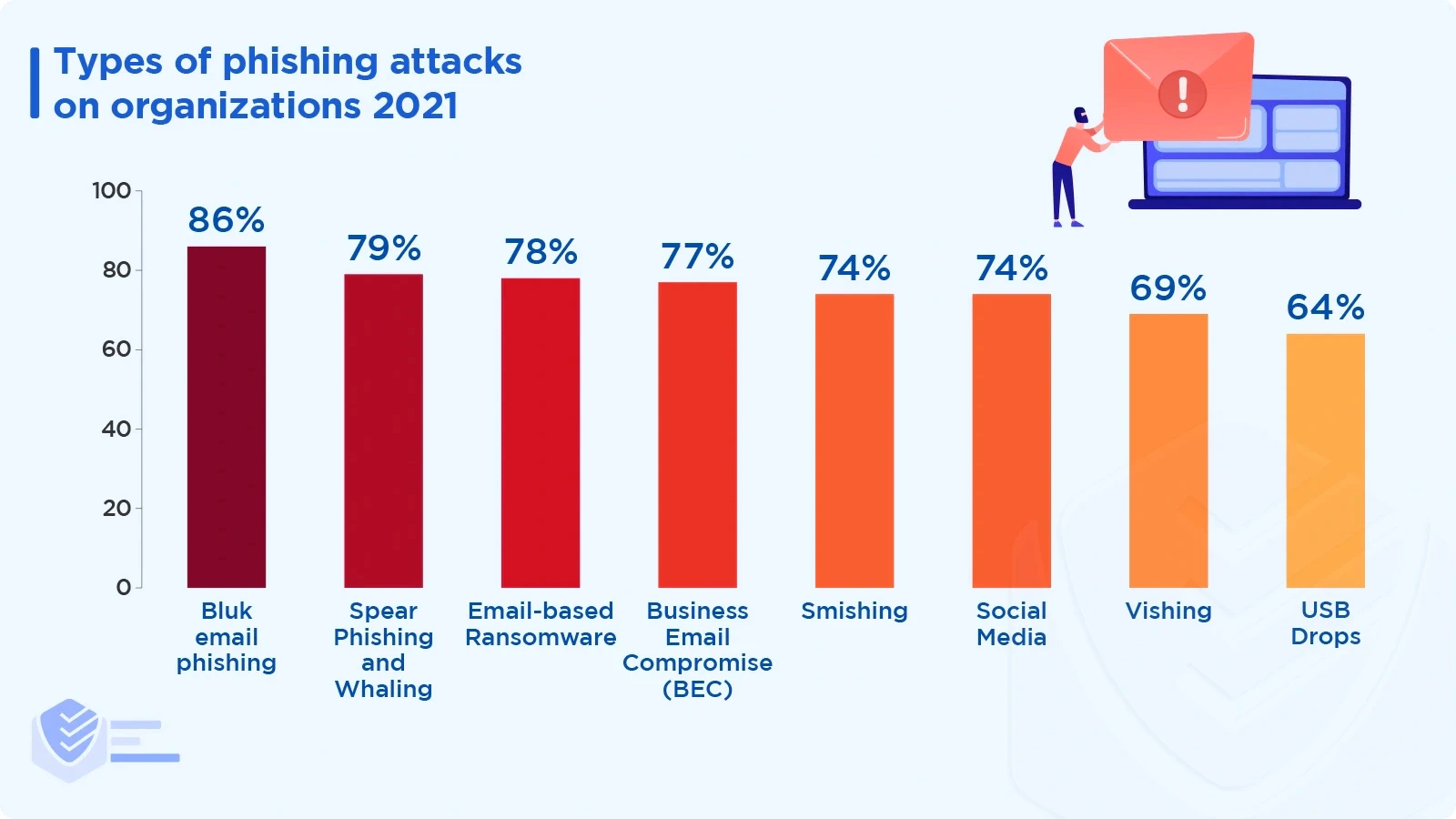
The next step is to look for signs that the attacker moved beyond the original phishing page.
A successful phishing attack may give someone access to email, shared files, customer information, or other systems connected to the employee’s account.
Check for activity that does not match the employee’s normal behavior, such as unusual logins, deleted messages, password reset attempts, unexpected file access, or new account permissions.
The FTC recommends reviewing logs, determining what information or systems were accessed, checking whether unauthorized access remains, and documenting the investigation.
Do not assume the incident is finished just because the password has been changed.
The important question is:
What could the attacker have done between the click and the response?